· 10 min read · Reverse Engineering · Android · Wear OS · Motorcycles · Personal project
Twistgrip: Reverse-Engineering the RTR 310's Bluetooth Stream
How I reverse-engineered the RTR 310's Bluetooth stream: reading the official app, diffing live captures one control at a time, then building Twistgrip.
I like knowing how things work. Not just using them: taking them apart, watching what they do, and working out why. A motorcycle is an unusually good subject for that, because a modern one is a small network on wheels. There is an engine controller, an ABS unit, a cluster, a Bluetooth module, and a handful of sensors all talking to each other. The rider sees a speedometer and a fuel gauge. Underneath, a lot more is moving.
The TVS Apache RTR 310 is one of those bikes. Its cluster talks to the TVS Connect app over Bluetooth Low Energy, and the official app surfaced less of it than I wanted: connecting was manual, the battery took a hit on days I never rode, and the phone kept getting nudged long after the engine was off.
So I treated the bike as an undocumented device. I read the official app, captured the bike's traffic, mapped its fields one control at a time, and wrote a decoder. This post is the reverse-engineering part: the method, the surprises, and what came out of it. The result is Twistgrip, an independent companion app for the RTR 310, with a Wear OS app and watch face alongside it. I don't work for TVS, and this is not an official app.
Start with the app you already have
The fastest way into a closed protocol is the vendor's own client. If an app can talk to the device, the app knows the service, the characteristics and at least some of the frame layout. I used static analysis on the official Android client (version 8.14.2) to find the BLE service, the frame layout and the parser paths for the Apache models.
Static analysis gave me a map:
-
The BLE service UUID is ASCII in hex. Decode it and it spells
TVSMVGSASBENTORQ. Always decode a UUID; vendors hide readable names in them more often than you would expect. - One characteristic is notify-only, one is write-with-response. The bike sends telemetry on the first and listens for commands on the second.
-
Frames start with
0x5Afrom the bike or0x5Bfrom the phone, end with0xFF, and have a data id in byte 1. -
Inbound payload bytes are XORed with
0xEA, and some frames carry a checksum. The parser classes in the app name the fields and their offsets.
The same code explained the battery behaviour I was measuring. In the version I examined, the official app runs a foreground service, holds a partial wake lock that is re-acquired on every connect, polls ignition every 200 ms, writes a keep-alive every two seconds with response, and restarts a low-latency scan every three minutes. None of that is visible from the outside. All of it is obvious in the code.
But the app's code is a map, not the territory. It tells you what the vendor's client believes, not what the bike actually does. Some fields looked like placeholders. Some code paths belong to other models. The bike has the final say.
Then make the bike the authority
I wrote a small Python client with bleak: scan for the service, subscribe to the notify
characteristic, and log every frame. The only thing it writes is the one low-risk status frame the official app
sends every two seconds. Everything else is read-only.
Three things surprised me immediately.
- The bike is silent until the phone talks. Subscribe and wait for 20 seconds, then 40: nothing arrives. Write the status frame once, and telemetry starts within about 50 ms. The cluster is not broadcasting into the void. It is waiting to be asked.
- The stream stops about nine seconds after the writes stop. The link stays up; the data just ends. So the keep-alive is not optional, and its period has to be under that window. The official app uses two seconds.
- Ignition off does not drop the connection. The stream stops, but the GATT link survives and the module keeps advertising. It only goes away later, on the supervision timeout. A client that waits for a disconnect to decide the ride is over will sit there showing the last frame it saw.
Those three facts are the whole reason the app's connection logic looks the way it does. Most of the hard parts of a BLE client are not in the happy path. They are in knowing what silence means.
The frame is the easy part
Every frame is 20 bytes. There is no length byte and no fragmentation: one notification is one frame. Multi-byte values are big-endian.
20 bytes, one notification = one frame

[0]      start     0x5A (bike) / 0x5B (phone)
[1]      id        which message this is
[2..17]  payload   big-endian fields
[18]     checksum  255 - (sum(bytes 0..17) % 256)
[19]     end       0xFF

on the wire: bytes 2..18 are XORed with 0xEA
The XOR is the same function in both directions, so decoding and encoding are one line each. Decode the XOR first, then validate the checksum, which is plain arithmetic. Once you can say "this frame is valid", you can trust a log. In the first live session, 116 of 116 status frames passed the checksum, which is the point at which the format stopped being a guess.
Map a control by changing one thing at a time
This is the part I would keep if I could keep only one technique. Reading code gives you candidate offsets. Only the bike tells you which candidate is real. So I wrote a guided capture script that speaks the instructions out loud and records a timestamp when each one starts and ends.
It connects, keeps the bike awake, and then says things like "Left indicator ON now. Keep it on." Fifteen seconds
later: "Left indicator off." The log gets a MARK left_ind start line between the frames. I operate the
bike; the script takes notes. No human timing, no notebook, no guessing which frame belongs to which action.
A second script does the analysis. For each marked window, it compares the set of values seen in every byte against the baseline window, ignores bytes known to be noisy (RPM, counters, checksums), and prints only the bytes whose value set changed:
left_ind      5A11[12]   00 -> 02
right_ind     5A11[12]   00 -> 01
hazard        5A11[12]   00 -> 03
side_stand    5A11[3]    40 -> 00
That is the whole trick: one variable, a timestamp, and a diff. Left, right and hazard are not three flags. They are three values of one field. The side stand is a bit in a state byte, sharing space with the brake and the kill switch.
The first guided run was messy. The test holds were short, and a temperature byte moved at the same time as the controls, producing false positives. The second run used longer holds and a simpler sequence, and the indicator mapping came out clean in a different byte. When a diff is ambiguous, the experiment is usually the problem, not the device. Slow down and run it again.
What the stream was carrying
Fourteen data points that the official app does not show turned up in the stream, including raw RPM at about three frames a second, throttle position, brake and side-stand state, kill switch, battery voltage, accumulated injection time, indicator state, MIL and ABS faults, cluster firmware version, the cluster's BLE address, the VIN, lean and acceleration values, TPMS frames, and the stored overspeed setting.
The timing is part of the protocol. The motion and trip frames arrive about every 0.3 seconds. The vehicle-state frame arrives about every 2.5 seconds, but it is also event-driven: it is sent when something in it changes, not only on a clock. That is useful for alerts, and it is a trap for a decoder that assumes every frame is periodic.
Absence is data too. Clutch, high beam, pass light, horn and engine start produced no frame at all. The protocol tells you what the cluster knows, not everything the bike does. A missing signal is not always a decoding failure; sometimes the wire genuinely has nothing to say.
My favourite finding was physical. Raising the bike off its side stand changed the fuel reading from 44% to 36% and the range from 156 km to 122 km. The sender is reading the tank at a lean, so the number moves when the bike stands up. That is not a decoder bug. It is a sensor doing exactly what it was installed to do, and it is why Twistgrip treats the fuel reading as stand-aware.
Some fields did not match the bike
A parser is a hypothesis with good formatting. In my captures, some values did not match the bike: an average speed of 199 km/h at a standstill, an instant mileage of 165 km/l at idle, and a byte that jumped between values with no correlation to any control. They may be placeholders, unit quirks, or intended for another model; I treat them as unverified. The engine-temperature offset was ambiguous, and the unit of the live fuel counter is still unverified.
That is why the research notes use three labels: [live] for confirmed on the bike, [code]
for read from the app's code only, and [?] for inferred. The legend is more valuable than any single
offset. It keeps you honest about what you actually know.
Reading across model variants matters too. The app is shared with other models, including the iQube, which use an authentication challenge and a lock command. The RTR 310's path does neither. If you only read the first parser you find, you can end up implementing a handshake the bike never asked for, or worse, sending a command meant for a different vehicle.
Some frames you should never send
The protocol includes calibration frames, lock and unlock frames, and vehicle-settings frames that double as trip resets. Some have no call site in the RTR 310 path. Some belong to other models. All of them are writable in principle, because a protocol does not distinguish between curiosity and damage.
So the rule for this project was simple: write only the one low-risk status frame needed to start the stream, and read everything else. I have deliberately left out the command frames that can change vehicle settings, calibration or locking. What is here is the safe telemetry and the method. Nothing in this post is intended to help someone write to a vehicle they do not own.
What the research changed in the app
Almost every design decision in Twistgrip came from something the bike did, not from a UI trend. The battery cost I measured became a rule: hand presence detection to Android's companion device framework, never scan in a loop, never hold a wake lock, and write the keep-alive only while something actually needs data. The cluster's BLE address means the app can reconnect by address without scanning. The ignition-off behaviour means it watches for silence, not for a disconnect.
The stream runs at roughly seven frames a second. The decoder drops what it does not display and allocates nothing on the hot path. The budget is under half a second from tapping the icon to a live cockpit, under a tenth of a second from the bike's answer to the first number, and zero allocations per frame. Baseline profiles ship with the app, and a benchmark suite keeps startup measured. A decoder can be correct and still feel slow.
From decoder to product
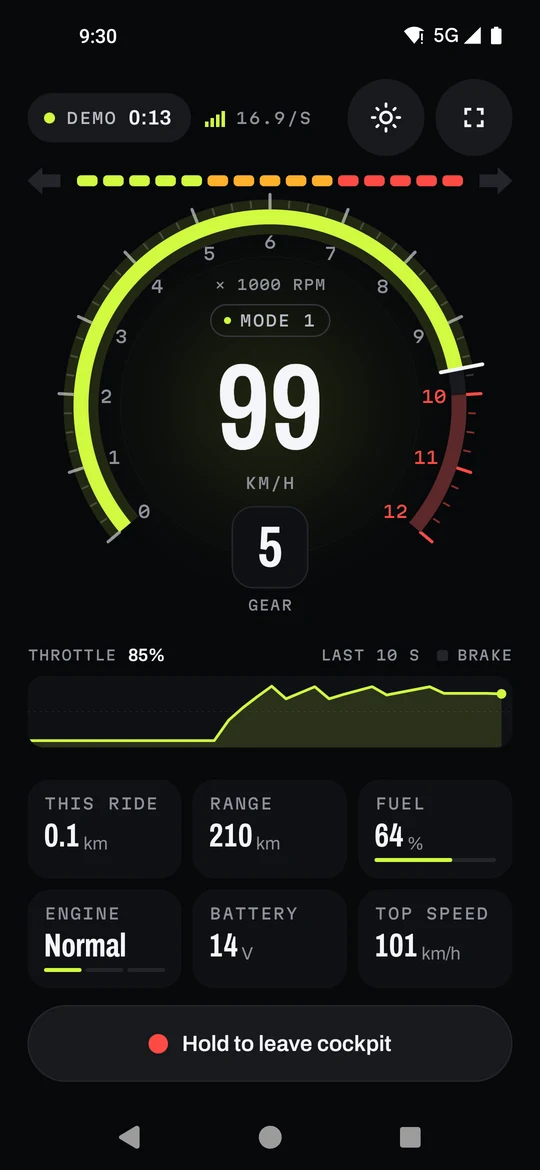
The cockpit puts speed, revs, gear and throttle in one place, with shift lights that build to the redline. Rotate the phone and mounted mode goes full width and keeps the screen awake, with Night, Sunlight and Auto themes. Rides record themselves when the engine starts, replay along their route with speed, gear and revs, and land in a logbook with monthly totals and CSV export.
Fuel is priced from your own fill-ups: litres and rupees per ride, with the stand-aware reading and a clear caveat that these are estimates, not laboratory measurements. On Wear OS, the ride screen shows speed, gear and revs, the indicators glow in from the edge of the dial, and a tile and watch face keep the useful numbers close. Ride events can drive Tasker, MacroDroid or Samsung Routines, and they never carry your location.
Routes, speeds and fill-ups stay in the app's local storage. There is no account, no analytics and no advertising code. The only request that leaves the phone is the map tile needed to draw a map. The trade-off is real: no cloud sync across devices. The CSV export is the escape hatch.
What I'd tell someone starting
If you are looking at a device that sends data you cannot read yet, the method matters more than the tools:
- Read the app, then trust the device. Static analysis gives you candidates. Only a live test turns a candidate into a fact.
- Change one variable at a time, and timestamp it. A spoken instruction and a MARK line beat a mental note every time.
- Diff values, not the bytes you expect to matter. The field you find is often not the field you were looking for.
- Keep a legend. Mark what is live, what is from code, and what is still a guess. Future you will need it.
- Write only what you need, and never send what you do not understand. Read-only is a feature.
The bike was telling me more than the dashboard admitted. The job was learning its language, then building something quiet enough to listen.
A note on use
Twistgrip is not a safety-critical system and is not a substitute for the instrument cluster, the owner's manual or scheduled maintenance. Fuel, range and cost figures are estimates. Set the app up before you ride; do not interact with it while riding. Use it at your own risk.
Corrections. If you own rights in material discussed here and think something should be corrected or removed, email [email protected]. I will review it and update the article. Last updated: 21 October 2026.
Twistgrip is an independent, personal, non-commercial project. It is not made by, affiliated with, sponsored by or endorsed by TVS Motor Company. “TVS”, “Apache”, “RTR”, “TVS Connect” and “iQube” are trademarks of TVS Motor Company. “Android”, “Google Play” and “Wear OS” are trademarks of Google LLC. These names are used only to identify the vehicles and software being discussed. All other trademarks belong to their respective owners.